

Delaware Department of Labor Logo Delaware Department of Labor


Claimant Hub


Claimant Hub

What does this mean for me?

LaborFirst is a unified enterprise system developed by the Delaware Department of Labor to modernize and streamline the Division of Paid Leave. It’s a portal where you can file and manage Paid Family Medical Leave Claims.

Am I eligible to file a claim?

Take this short quiz to find out whether you may be eligible to file a Paid Family Medical Leave (PFML) claim. This quiz is only meant to help you understand your options—it is not an official decision from the Paid Leave Division. Completing the quiz does not file a claim, nor does it guarantee that a claim will be approved or denied. For questions or guidance, please talk with your employer or call the PFML help line at 302‑761‑8375.

Go to the Portal

Claimant Knowledge Base

Click + to expand

Video Walkthrough

Troubleshooting

  • During registration, if you don’t see the Identity Proof tile on your My.Delaware Dashboard, follow this guide.

Video Walkthrough

Quick Reference Guide


Filing a Claim by Daniel Sanders

Filing for Medical Leave – Video Walkthrough

Filing for Family Caregiver Leave – Video Walkthrough

Filing for Parental Leave – Video Walkthrough

Filing for Qualified Exigency Leave – Video Walkthrough

Quick Reference Guide


Claimant – Claim Management, Request Claim Review by Daniel Sanders

Video Walkthrough

I don’t see the option to File a Claim

If you log into LaborFirst and do not see the option to File a Paid Family Medical Leave claim, it is likely that you did not complete the Identity Proofing step.
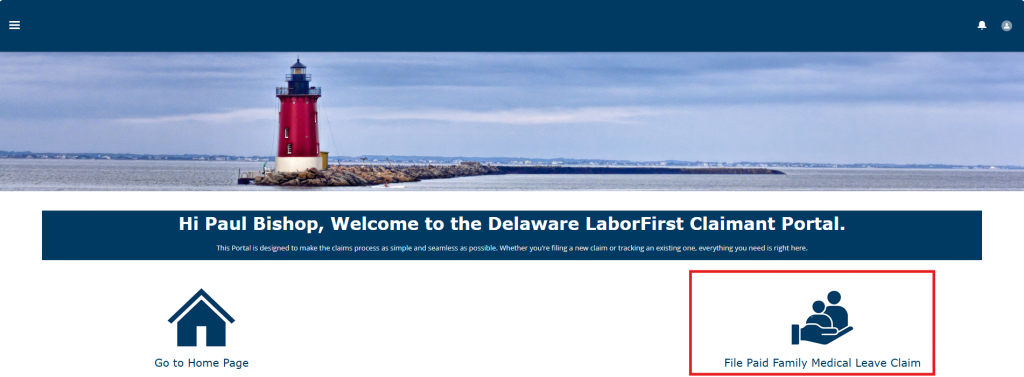
The LaborFirst home page. There are two icons, one to go to the home page and the other to File a Paid Family Medical Leave Claim.

How to resolve

If you log into My.Delaware.Gov and see an Identity Proofing Tile, click it. It may look slightly different than this but look for the words “Identity Proofing.”

You’ll also see a LaborFirst tile, but you must start by clicking the Identity Proofing tile.
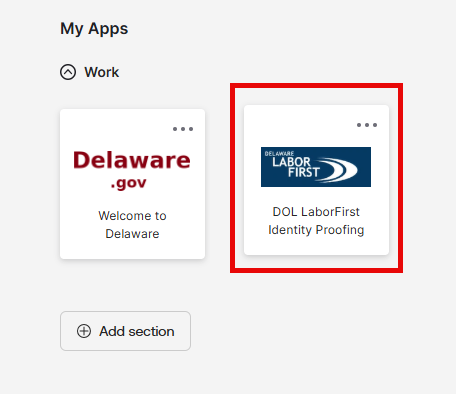
The My Apps section of the My.Delaware.gov dashboard, with the DOL LaborFirst Idenity Proofing tile highlighted.

Follow the steps to verify your identity. 

Note: You’ll need a government-issued photo ID, and the process will take about ten minutes. 

For more help with the process, you can follow this guide: Identity_Proofing_Guide.pdf 
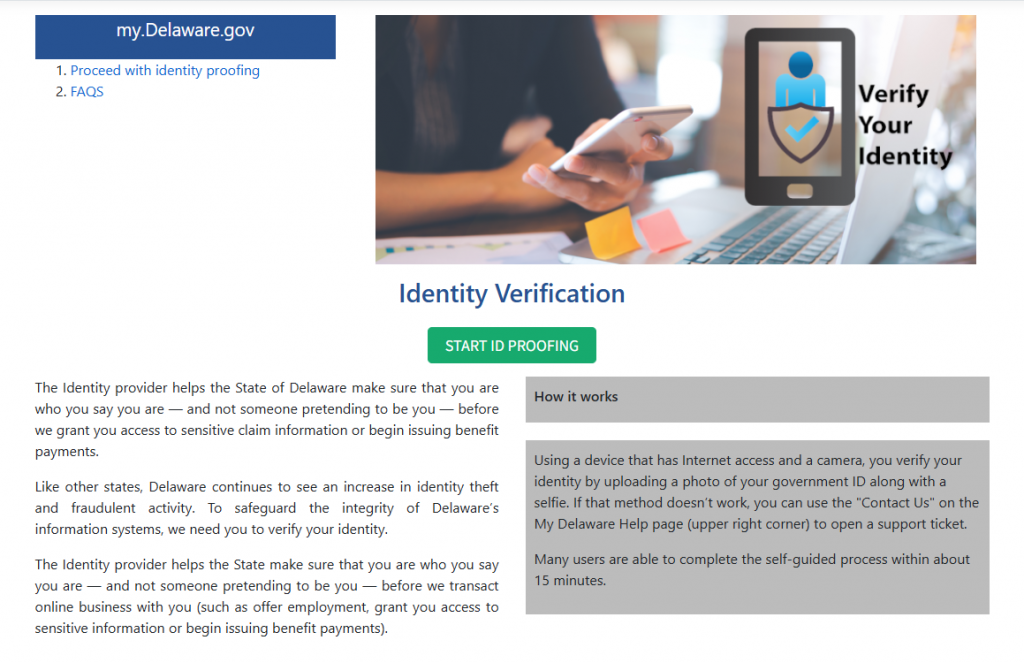
The Identity Verification page

Wait to enter LaborFirst until you get a confirmation email that your identity is confirmed.  
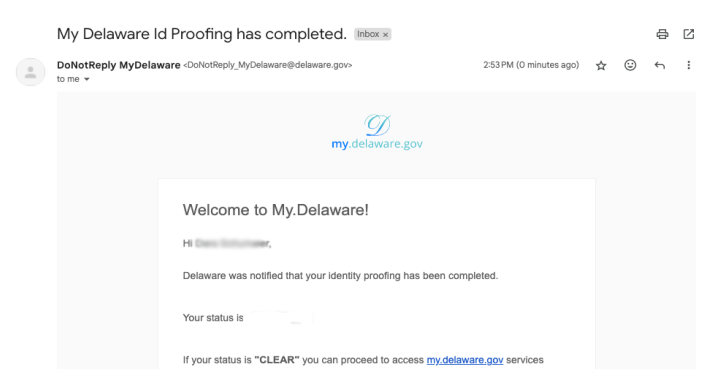
A confirmation email from my.delaware.gov indicating that the identity proofing process is complete.

Once you get the email, you can click the LaborFirst tile in your My.Delaware.Gov dashboard to enter LaborFirst.
the Delaware LaborFirst Claimant Portal

You should now see the option to file a claim. 

The LaborFirst home page. There are two icons, one to go to the home page and the other to File a Paid Family Medical Leave Claim.

Claimant FAQs

Identity proofing

Identity Proofing is how you will prove your legitimate identity using any government-issued photo identity document and a third-party solution named Okta.

  • The self-guided process takes only about 5-10 minutes
  • It can be done using any device, including a smart phone, that has a camera and is connected to the Internet.
  • It can be done at a public library(Opens in a new window.) computer for anyone without a personal device.

For more information see the Identity Proofing Guide

If you are having trouble with identity proofing, login, or verification codes you can call the Delaware Department of Technology and Information (DTI) Service Desk (302) 739-9560. You can also submit a ticket for login issues for My.Delaware.

Checking your claim status and required documents

Log in, and then click ‘go to your home page’, then click the claim ID. On this page you can see the claim status and other details about your claim.  

Uploaded correspondences will be displayed on your claimant portal home screen.  

  1. Start at the Claimant Welcome Portal  
  1. Click the house icon labeled Go to Home Page 
  1. On the bottom of the screen, there is a panel called “Correspondence.”  

For claim-specific documents  

  1. Click the hyperlink under the Account Divisions panel. This will take you to the Paid Leave Account Division Screen.  
  1. On the bottom of the screen, there is a panel called “Correspondence.” 

Check your claim status in LaborFirst: 

  1. Start at the Claimant Welcome Portal   
  1. Click the house icon labeled Go to Home Page 
  1. Click the hyperlink under the Account Divisions panel. This will take you to the Paid Leave Account Division Screen 
  1. Click the hyperlink associated with the claim 
  1. The status of your claim will reflect whether the form has been submitted by your provider. 

If your provider HAS NOT sent the form 

Status will be ‘Pending,’ and the reason will be ‘Health Care Provider Certification.’ 

If your provider HAS sent the form 

Status will be ‘Pending,’ and the reason will be ‘Employer Adjudication.’ 

If you provider hasn’t submitted the form, you are encouraged to follow up with your healthcare professional to ensure that the Certification is completed as soon as possible. 

Eligibility and types of leave

Delaware Paid Leave offers paid leave to employees who have been employed for at least 12 months and have worked at least 1,250 hours in the most recent 12 months with a single employer. If leave is approved, an employee will get up to 80% of their wages (up to $900 per week).

Medical Leave (your own serious health condition)
Family Caregiver Leave (care for parent, spouse, or child)
Parental Leave (bonding with newborn, adopted, or foster child)
Qualified Exigency Leave (military deployment-related needs)

Reduced Hours Per Day  

Allows the claimant to continue working standard number of days per week, but with a reduced number of hours per shift.  

Reduced Days Per Week  

Allows Claimant to maintain the full duration of the shift but reduces the number of days per week worked.  

Intermittent leave   

Allows the claimant to take leave in separate blocks of time on a periodic basis. PFML requires that employees take intermittent leave in increments of no less than a full day. 

If your health care provider certifies that you need time off during pregnancy, you can apply for medical leave before your baby is born. Keep in mind that Delaware Paid Leave caps total benefits at 12 weeks in a 12-month period across all leave types, so any medical leave you take before delivery is subtracted from the 12 weeks of parental leave available after the birth. Medical leave is also limited to 6 weeks every 2 years, so time used during pregnancy counts toward that limit too. You and your provider decide how and when to use your leave. This information is here to help you plan. 

For example, if you take 4 weeks of medical leave before delivery, you will have up to 8 weeks of parental leave remaining, and 2 weeks of medical leave left in that 2-year period.

Worker’s Compensation 

If the “qualifying event” (the incident that triggers the paid leave claim) is work-related, then the claim can only be submitted as a Worker’s Compensation claim.  

Unemployment Insurance 

If you are no longer employed by the employer, then you are not eligible for paid leave, but Unemployment Insurance benefits may be available to you.  

Personal Injury Protection (PIP) Policy 

If the qualifying event is covered by an auto insurance policy’s Personal Injury Protection (“PIP”) policy, it is excluded from Delaware Paid Leave Program.  

Short Term Disability 

If you have already submitted a claim for Short Term Disability, you may be able to receive benefits under the Paid Leave Program as well depending on the facts specific to your situation.

Delaware Paid leave can tell you if your employer uses a third party or private plan, but how to file will depend on what type of plan your employer uses. You should confirm with your employer directly. 

Payments

Once the claim is approved, you can expect your first benefit payment in two weeks. 

If the payment shows $0

The monetary system should update within 24-48 hours.

Benefits exhausted

You have used the allotted allowance (6 weeks medical or 6 weeks family) in a 2-year period. The claim has been fully paid out and there is no coverage allowance left.

You can choose to receive benefits via a debit card (which we will mail to you), or direct deposit to your bank account. 

It depends if your bank is “In-network.” “In-network” refers to the U.S. Bank or MoneyPass® or Allpoint®ATM networks. Locations can be found at usbank.com/locations or moneypass.com.  

The most up-to-date information about the prepaid debit card can be found at this link:  

Prepaid Card Disclosure. 

Filing, updating, or managing your claim

After you log into LaborFirst, click File Paid Family Medical Leave Claim and the system will guide you through the process. If you need additional help, review the guides found on the LaborFirst Claimant Hub. 

Mobile browsers are not supported at this time, so if you are trying to file via a phone or other mobile device, you might not be able to finish filing your claim.   

Please submit your claim from a desktop or laptop computer. If you do not have access to a desktop or a laptop, you can visit any of our office locations. 

Computers can also be used free of charge at your local library.

If your claim has already been approved, and you want to cancel your claim please email PFMLClaims@delaware.gov or call 302-761-8375. 

Denials and overpayments

You can request a claim review by logging into LaborFirst, reviewing your clam details, and clicking Request Claim Review in the upper right corner of the screen. 

For questions about overpayments, repayments, or refunds, email PFMLClaims@delaware.gov or call 302-761-8375.